native macOS · five agent CLIs
You're five agents deep. #2 has been waiting on you for twenty minutes.
Running one AI coding agent is easy. Running five is a different job. They don't finish on a schedule, they finish when they finish, and they stop dead the second they hit a permission prompt or a question. The work isn't the typing anymore. It's knowing which session needs you right now, before it sits idle for half an hour. vord is a Mac app that hosts every session in a real terminal, reads what comes back, and tells you at a glance who's working, who's waiting and who's done. Then it pings you the moment one needs a decision.
// Your CLIs, your accounts, your machine. Sessions run locally and your code stays there.
the problem
Parallel agents break the way you pay attention
The forgotten idle session
You kicked off a refactor twenty minutes ago. It finished in four. The other sixteen minutes were dead air, because nothing told you it was done.
No status at a glance
Five tabs, all scrolling output. Which one is blocked on a permission prompt and which one is just thinking? You find out by clicking through all of them.
Window juggling
Two terminals, an IDE, a browser for the preview, your phone for the one running at home. The agents are fine. Your attention is the thing that's overloaded.
how it works
Run them. vord watches. You get pinged.
Run your sessions inside vord
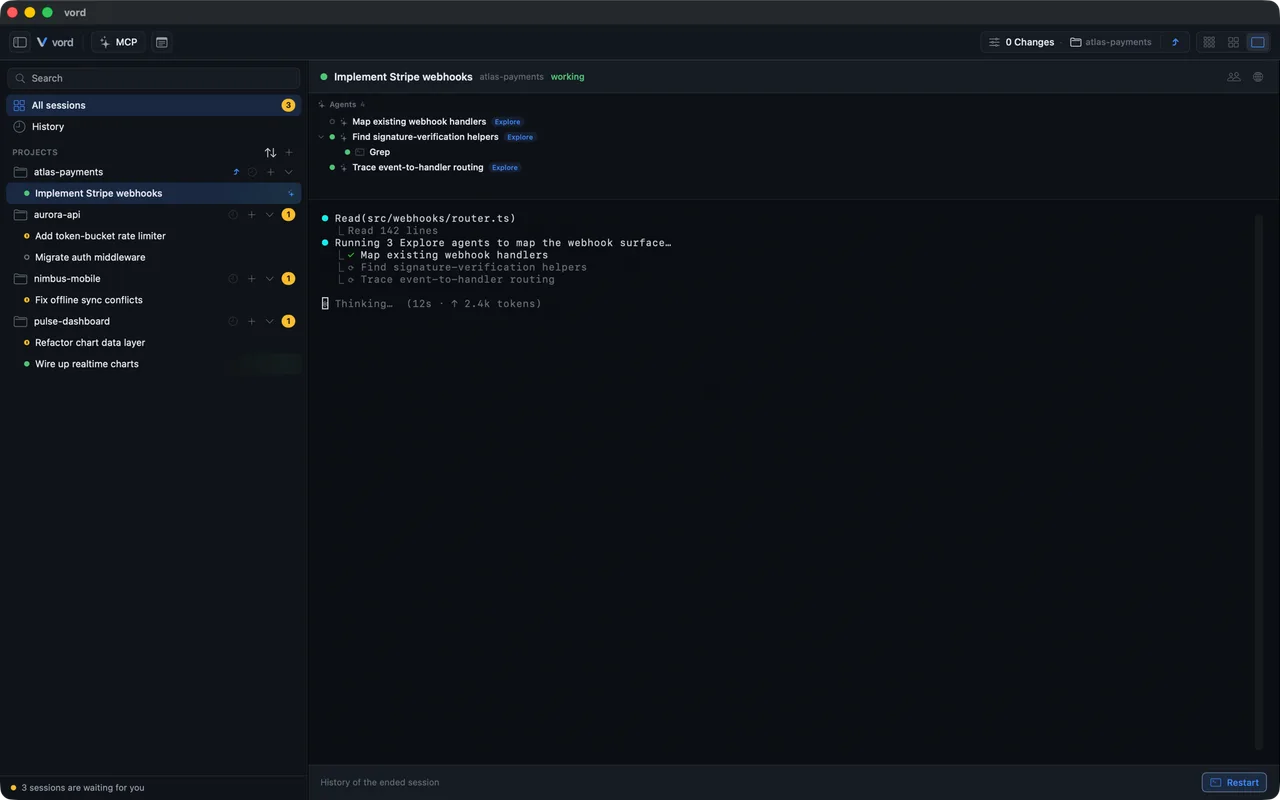
Claude Code, Codex, Kimi, OpenCode, Grok, a plain shell, an SSH connection. vord starts each one in a real PTY terminal and keeps it running, in front or in the background. You install and run the CLIs yourself with your own accounts. Clone a repo into a new project without leaving the app.
vord reads the status of every session
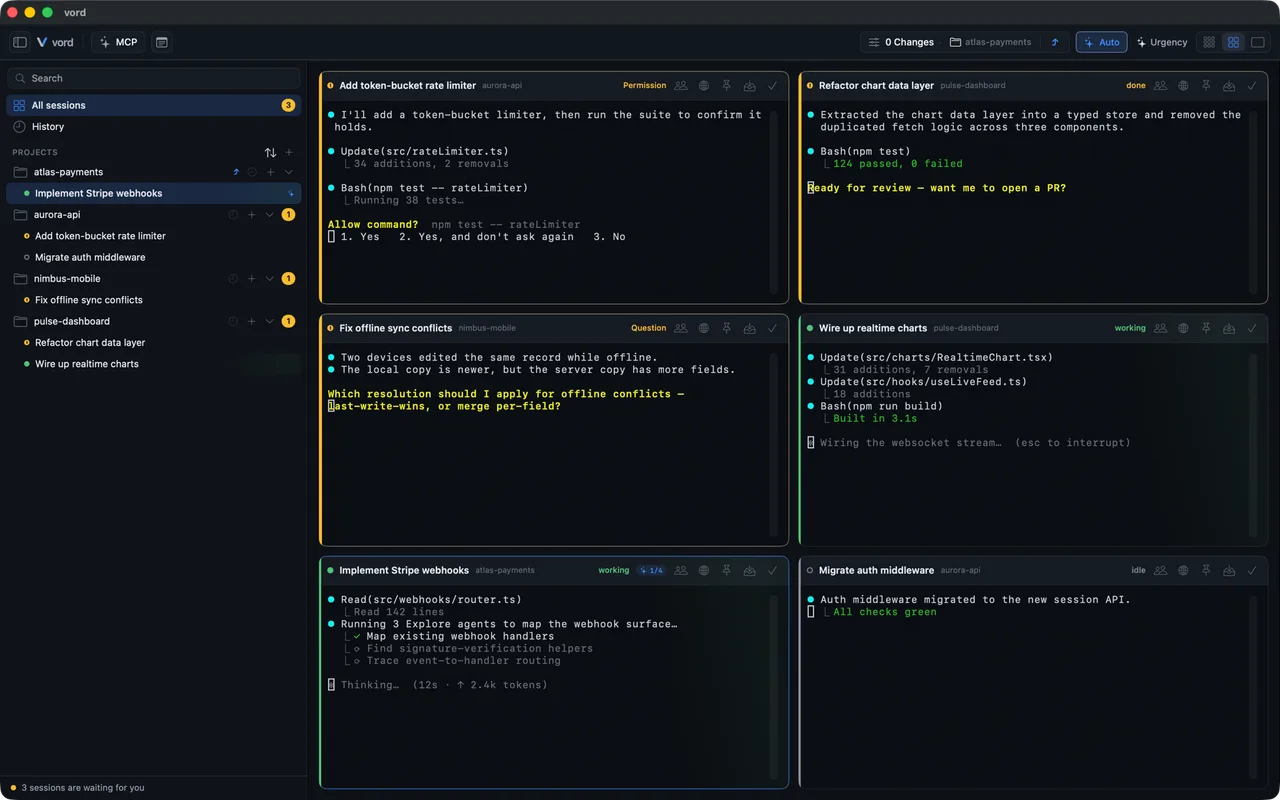
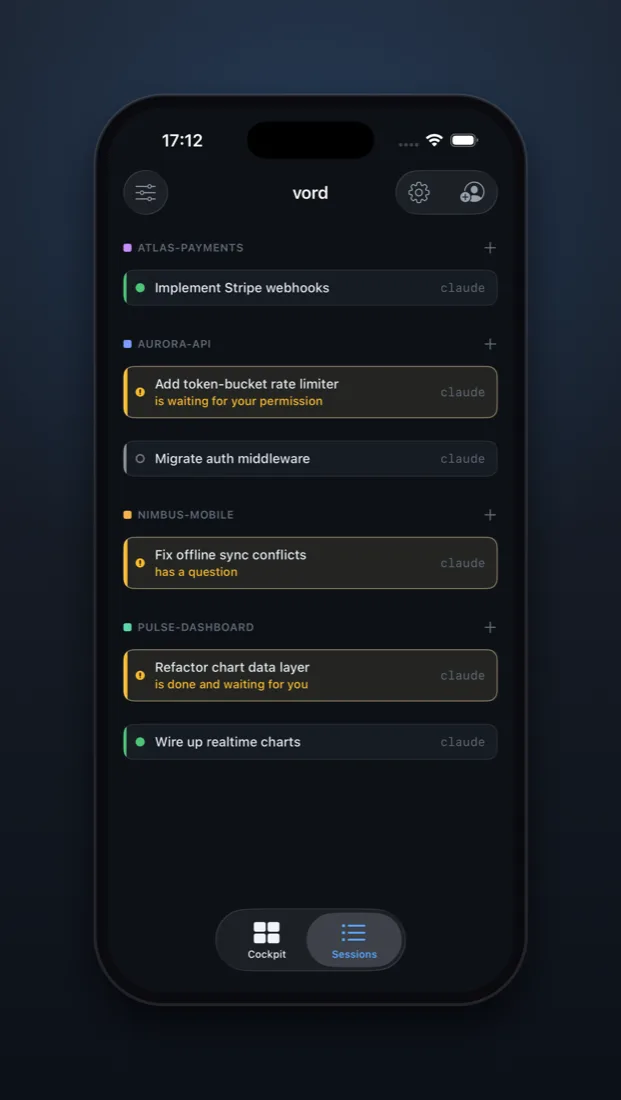
It owns the terminal, so it sees everything. Where a CLI reports its state through hooks, vord uses those structured events; where it doesn't, a screen heuristic fills in. Every session lands in one place: working, waiting on you, idle, exited, or out of quota. Sorted so the ones waiting on you sit at the top.
You get pulled in at the exact moment it matters
When an agent hits a permission prompt, asks a question or wants a plan approved, your Mac tells you: a system notification, a Dock badge, a sound. Nothing when nothing needs you. You go back to the one session that's blocked, answer it, and the rest keep running.
the cockpit
One grid for every agent, across every project
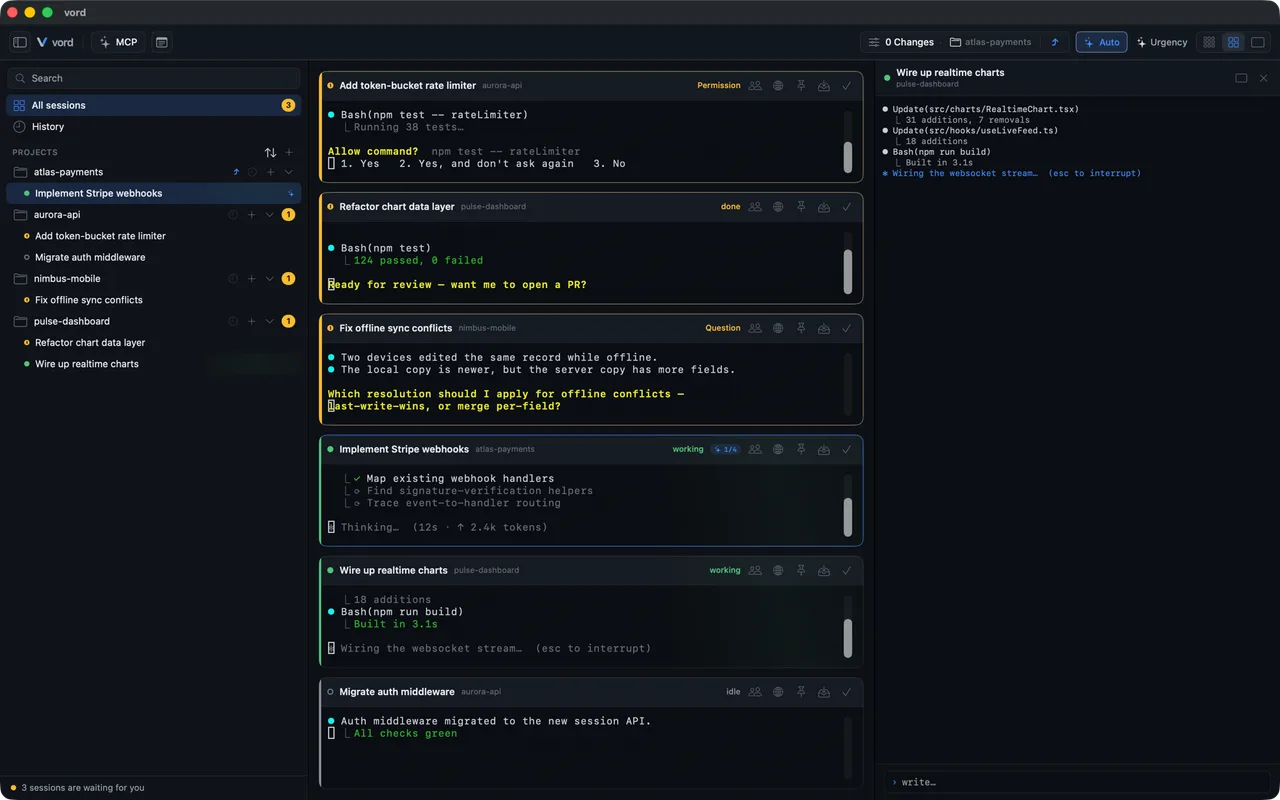
The grid is the part you'll keep open. Every session shows up as a card with its live status, sorted so anything waiting on you is first. You stop hunting for the blocked session, it's already at the top. Five states cover it: working, waiting on you, idle, exited, and out of quota. When an agent is waiting, vord tells you why: a permission request, a question, a plan to approve, or simply finished. It doesn't stop at the top-level session either. When an agent spins up subagents or a workflow, that work shows up too, so you see what your fleet is actually doing rather than that it's busy. Pick the view that fits the moment:
- Compact — status cards only. Scan thirty sessions in one look.
- Cockpit — the grid with a live slice of each terminal, in the tile density you pick.
- Team — parent sessions and their child agents as one unit.
- Focus — one session full size and fully typeable, with a gallery to jump between them, or two side by side.
notifications
Your Mac is the one place that always knows
Every status change goes through one place that builds the message, localizes it into English, German, French or Spanish, and hands it to all the right outputs at once: a Mac banner, a Dock badge with the waiting count, an optional sound, and a push to your phone if you run the connected features. Permission prompts and direct questions arrive as time-sensitive, so they cut through Do Not Disturb when they should. A settle time keeps a burst of state changes from turning into a burst of banners. There's a presence check as well: if you're sitting at your Mac, vord doesn't push to your phone. You get the alert where you actually are. And you can hide session and project names in push notifications, in case your lock screen isn't private.
the differentiator
A terminal can run six agents. It can't show you a diff.
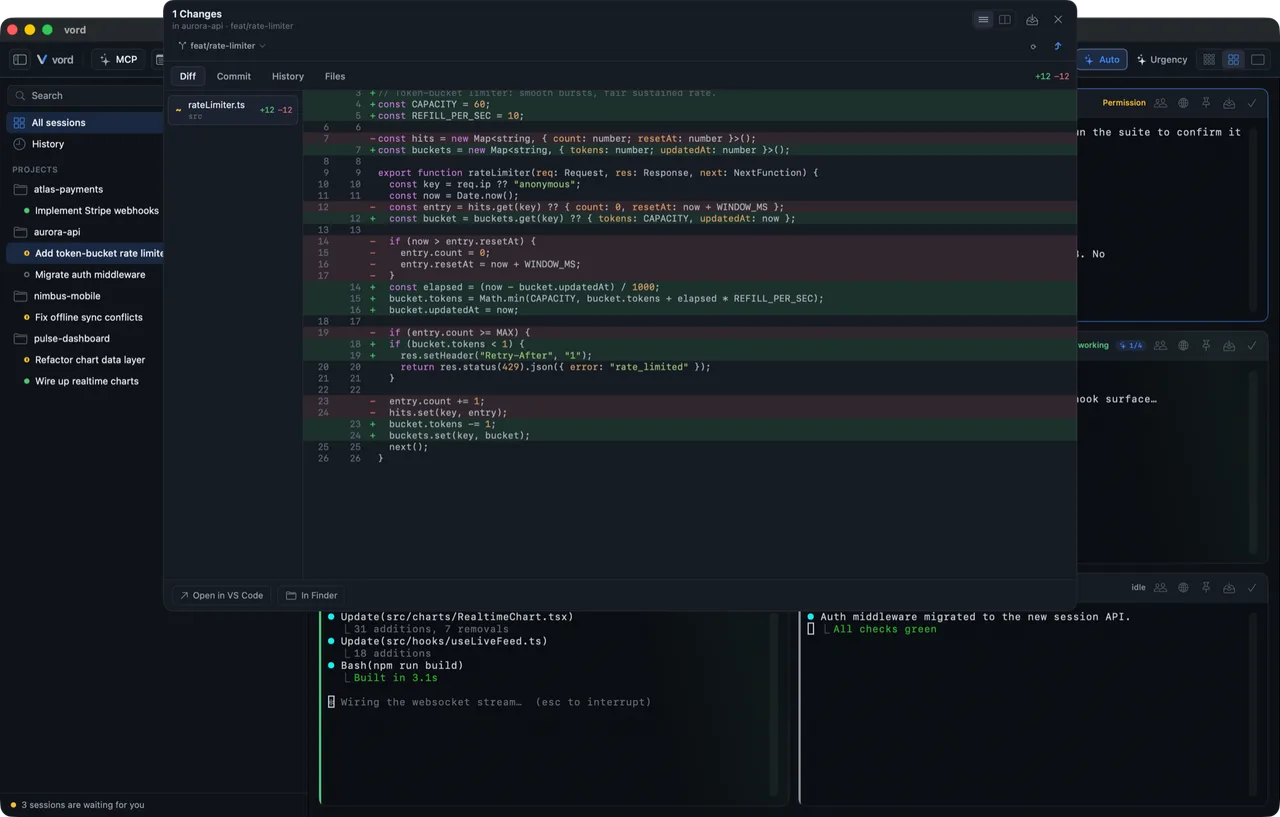
When an agent says it's done, you still have to check what it did. vord slides a panel in from the right and gives you enough to read the work without leaving the cockpit. You can make the occasional correction here, and that word is doing real work: this is for understanding what the agent built, not for writing code yourself. Open the file in your editor or in Finder when you want the real thing. See your branch, switch it, create one. Worktrees are read-only on purpose, vord shows them and never creates them.
- Diff tab — green and red, syntax highlighting, inline or side by side.
- File tab — the whole file, with search and a symbol outline so you can see the shape of what changed.
- Commit tab — stage by file or by single hunk, take an AI-drafted commit message, edit it, commit. Fetch, pull and push from the same place.
the connected features
Answer the permission prompt from the train
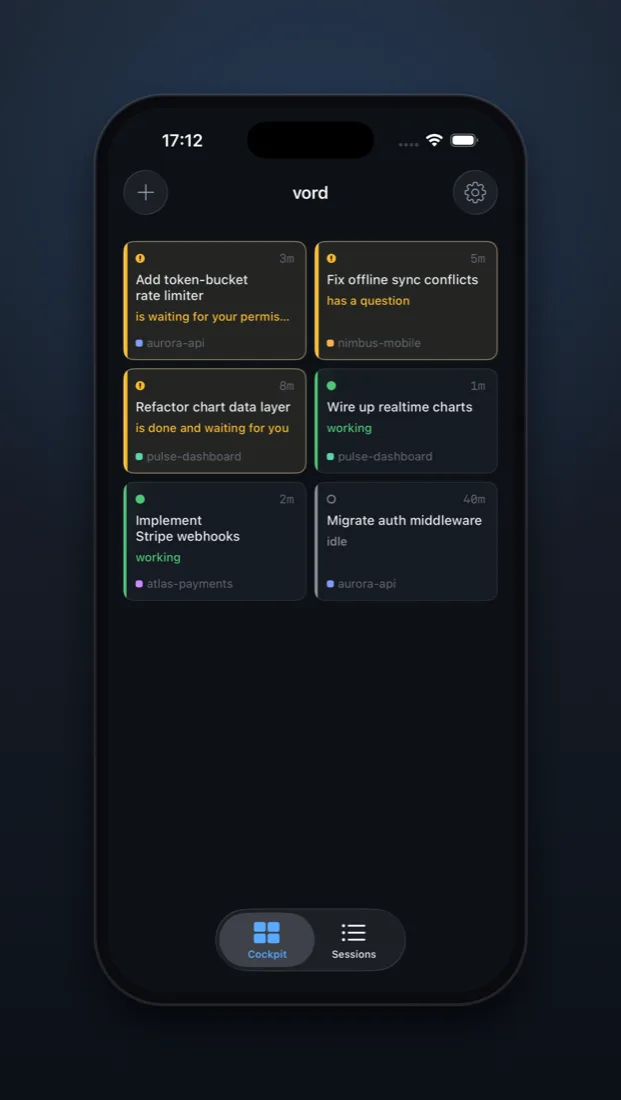
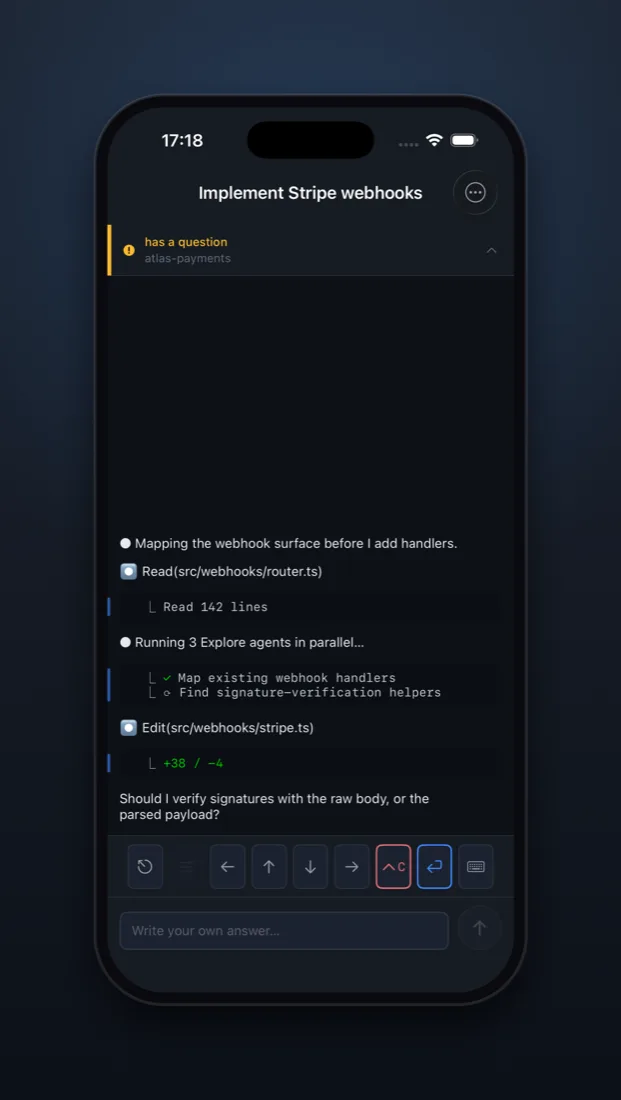
Your agents run on your Mac. With the connected features you drive them from your iPhone: see the live terminal, type, answer permission and plan boxes with native buttons or your own typed reply, send images from your photo library, switch the agent's permission mode, start and switch sessions. The waiting agent doesn't have to wait until you're home. The connection is end-to-end encrypted through a blind relay. Mac and phone both connect outward, so it works behind NAT, and the relay only ever moves ciphertext. Under the hood it's Apple CryptoKit: X25519 key exchange at pairing, ChaCha20-Poly1305 for every frame, replay protection built in. Pairing is a QR scan or a paste with a six-digit fingerprint you confirm on both ends. Approval boxes travel as structured data rather than scraped output, so the buttons on your phone mean exactly what they say. Only terminal streams go over the wire. Never your files.
- Native buttons, or your own typed answer, for every permission, plan and question box
- Send images, switch permission modes, start sessions from your phone
- End-to-end encrypted through a blind relay — terminal streams only, never your files
- The iPhone companion is on TestFlight and invite-only while we build it out
session sharing · beta
Hand a live session to another person
An agent is mid-task and you want a second pair of eyes on it. Send a share link. The other person opens it in vord on their Mac, or on an iPhone, and watches the same terminal live. They start read-only. Let them type when you're ready, take it back whenever. Ending the share is one click, and the link was single-use anyway. We looked at sixteen comparable tools and none of them documents an end-to-end encrypted relay for this.
-
Read-only first
A share starts as watch-only. Grant typing when you actually want a hand, and take it back live. The guest never has more access than you handed them.
-
One link, one session
Share by link or QR code. It opens exactly one session — not your Mac, not your files. Links are single-use and expire on their own.
-
Sealed end to end
Each share gets its own one-time keys. Host and guest can read the stream. The relay in the middle can't — it only routes ciphertext.
vendor-agnostic
Five agent CLIs, one grid
vord doesn't care whose agent you're running. Claude Code, Codex, Kimi, OpenCode and Grok all live in the cockpit, each with its own status detection, all reporting into the same grid. Run three of one and two of another in a single project and treat them as one fleet. You install and start the CLIs yourself with your own accounts, so nothing is locked to a vendor. vord manages their MCP servers too, side by side with live health checks, through the official CLIs rather than editing config files behind their backs. It ships its own MCP server as well, with a tool that puts an image or a page in front of you wherever you happen to be working.
// local & native
A real Mac app, and your code stays on your Mac
-
Native, not Electron
Written in Swift with SwiftUI and AppKit, no web view pretending to be an app. Runs on macOS 15 and up, on Apple Silicon and Intel.
-
Your code never leaves
The agents run on your machine. The git inspector reads your local repo. Even the iPhone remote streams terminal output only, never files.
-
Signed and notarized
Developer-ID signed by M&R Technologies and notarized by Apple, delivered as a DMG. It updates itself through Sparkle with signed releases, and never installs one without your click.
where it fits
Between your terminal and your IDE there was nothing. Now there's vord.
A terminal multiplexer gives you panes. It can split tmux six ways, but it can't tell you which agent is blocked, and it can't show you a diff. An IDE gives you everything for writing code, and most of it is dead weight when the agent is the one writing. vord is the layer in between. It owns the sessions like a multiplexer, reads them like a supervisor, and shows you the work like a lightweight reviewer. Built for the actual job: running several agents at once and spending your attention only where it's needed.
Prices aren't set yet
vord is a paid app and we haven't settled the plans. Rather than post a number we would have to walk back, we're keeping the figures off the site until they hold. The waitlist hears them first, with the plan they belong to.
One list for the app. We write when there is something to say.
the honest answers
The honest answers
Is this an IDE?
Which agent CLIs does it run?
Does my code go to your servers?
Can someone else watch or drive one of my sessions?
How does the status detection actually work?
Can it answer the boring prompts for me?
What about the git side, full version control?
What does it cost?
What do I need to run it?
Stop tabbing through terminals to find the one that needs you
We're getting vord ready for a wider audience. Leave your email and we'll write once, when there's a version for you to run.