features
Stop checking every tab. vord tells you which agent needs you.
Most of these features exist for one reason: the time your agents spend working should be time you spend on something else. You get pulled back when a decision is actually waiting. Here is the whole set, in detail.
Free to join. One email when there is news. Nothing else.
session hosting
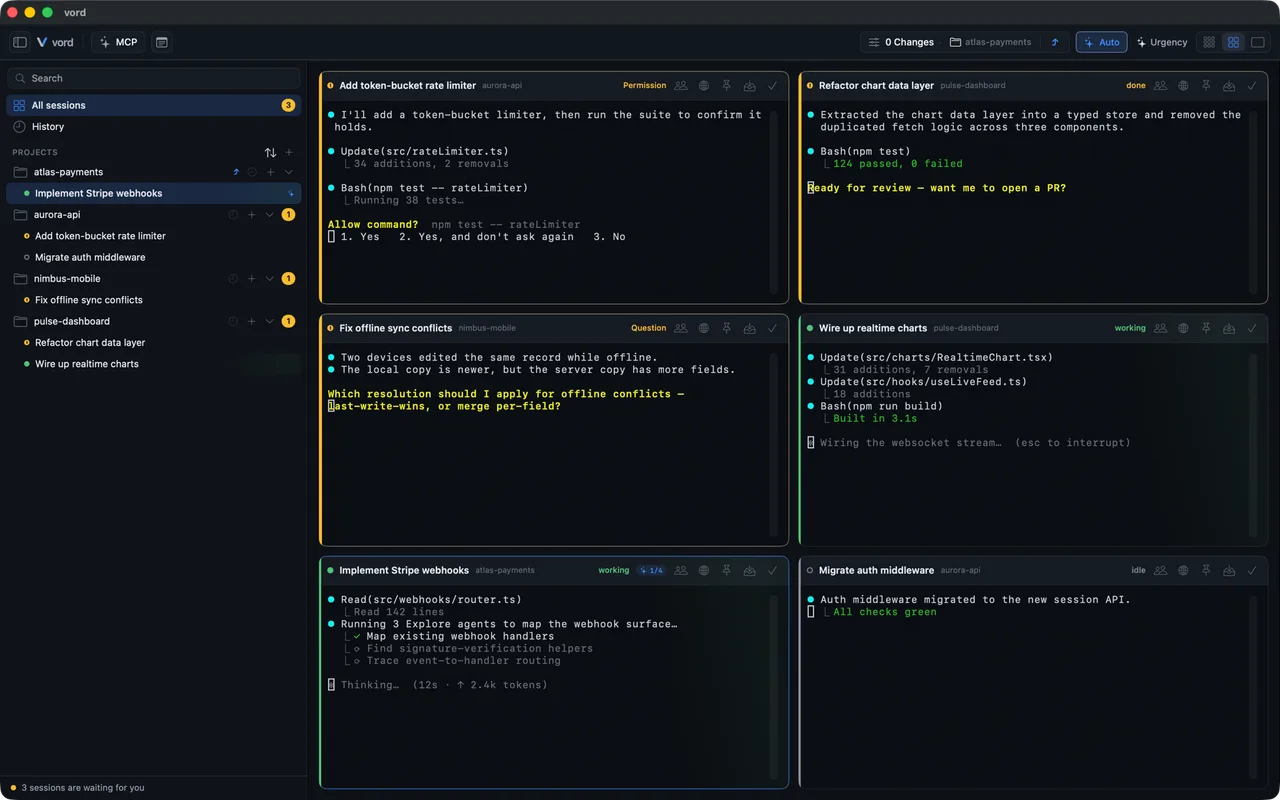
Every session runs in a real terminal
vord does not watch your sessions from the outside. It hosts each one as a real PTY terminal, which is why it can see every byte and why the status detection works at all. Claude Code, Codex, Kimi, OpenCode and Grok start natively, side by side in the same window. You install the CLIs and keep your own accounts; vord is the terminal platform around them, not a host for the agents. Sessions keep running whether they are on screen or not.
- Five agent CLIs start natively: Claude Code, Codex, Kimi, OpenCode and Grok.
- Each CLI has its own status detection, so every card in the grid reads the same way.
- SSH connections and SCP file transfer live in the same app.
the status engine
The part that actually knows what each agent is doing
This is the core. Because vord hosts the PTY, it can tell working from waiting from idle without you clicking into anything. The primary signal is hooks: the CLI reports structured events, so vord knows the state instead of reading it off the screen. Screen heuristics only fill in when hooks are not available. All five supported CLIs have their own detection. That typed wait reason is what makes the notifications precise and the remote buttons trustworthy, because vord knows the agent is asking this specific thing.
- 🟢 working — the agent is busy, leave it alone.
- 🟡 waiting on you — blocked, and vord says why: a permission request, a question, a plan to approve, or a finished turn.
- ⚪️ idle — nothing happening.
- limited — the agent hit its usage limit.
- exited — the session ended or failed.
the cockpit
Four views, one fleet
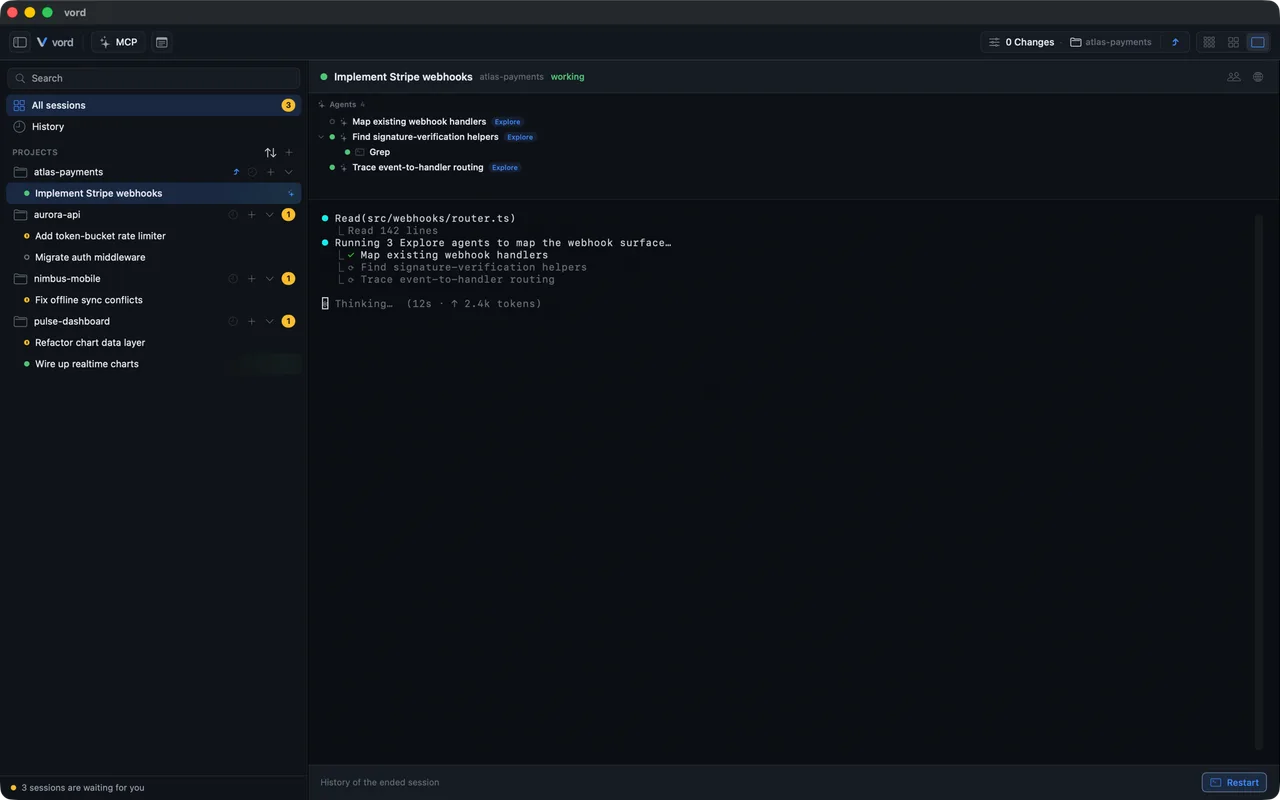
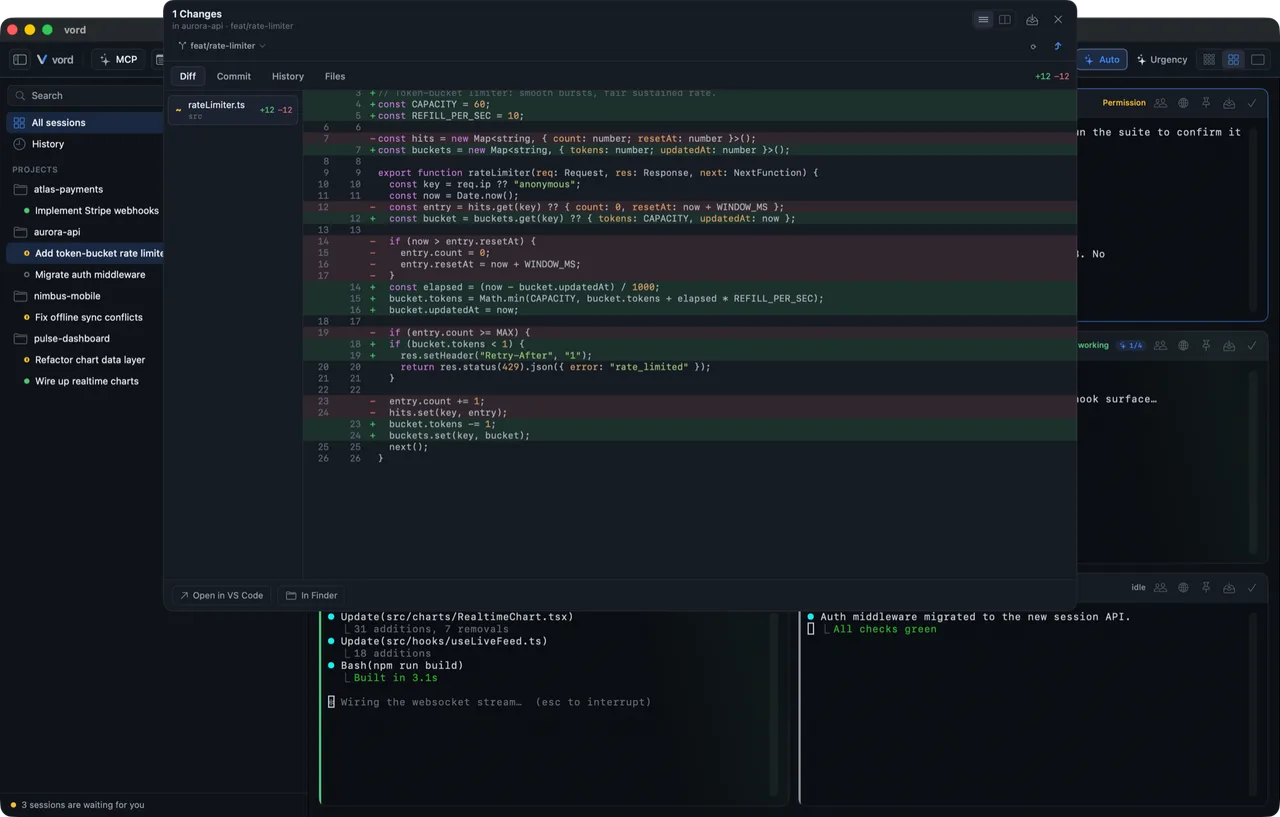
The grid pulls every session from every project into one view, sorted with anything waiting on you at the top. Switch the view to match what you are doing, and set the tile density so a big fleet still fits on screen. Pin the sessions you care about and let the rest fall into an overflow pool. Parent and child sessions get a family layout, so a delegating agent and its helpers stay together.
- Compact, Cockpit, Team and Focus — four views over the same fleet.
- Focus mode with a gallery of the other sessions and a focus split for the one you are steering.
- Tile densities, pinning and an overflow pool keep a large fleet readable.
notifications
Told once, in the right place
Every status change runs through one notification path. It builds the message, localizes it (the app speaks English, German, French and Spanish) and sends it where you are: a macOS notification, a Dock badge with the number of agents waiting on you, and an optional sound at the waiting moment. A settle time keeps a flickering session from firing three alerts in a row. Anything you miss lands in the inbox, so you can work through it later instead of scrolling back through terminals. On Pro, the same event reaches your iPhone.
the git inspector
Read the work before you trust it
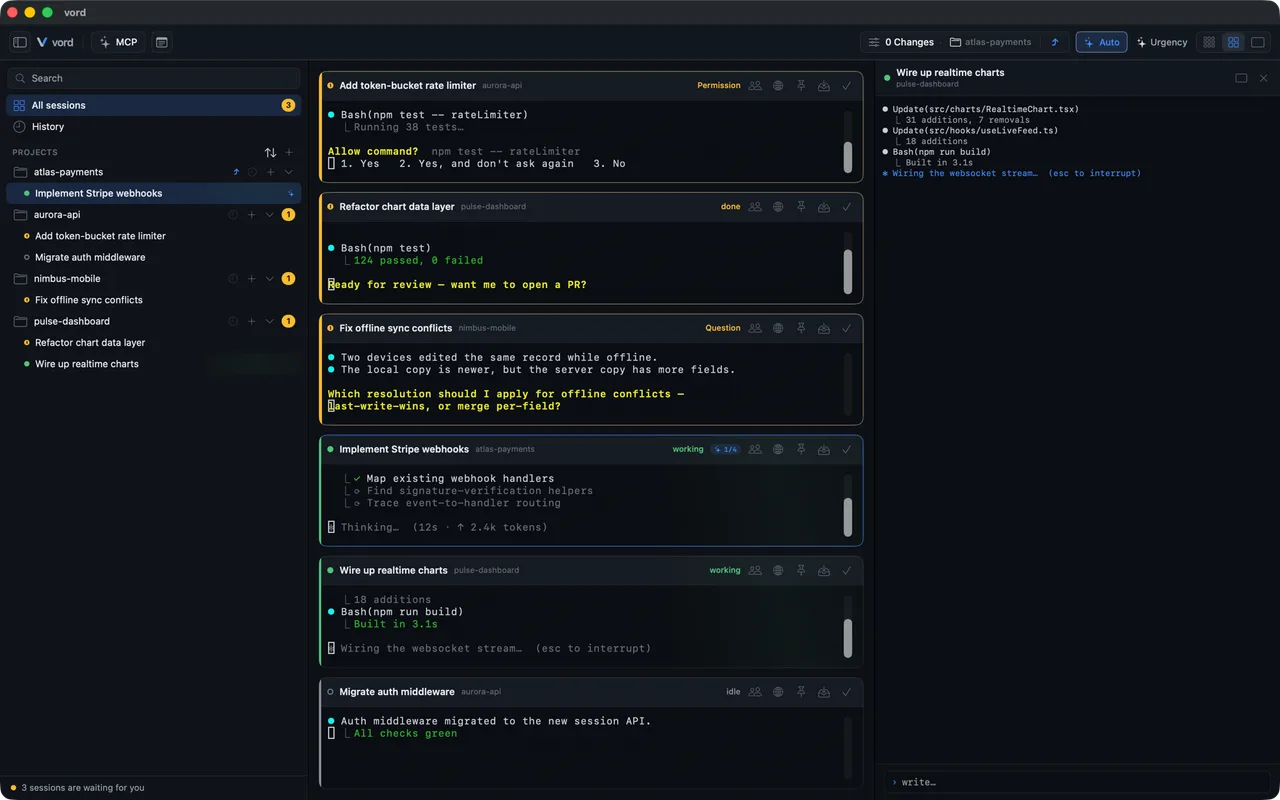
An agent finishing is not the same as an agent being right. The inspector slides in from the right so you can check the diff without breaking your flow. It is a review surface, not an editor. On the branch side you can switch and create branches and run git sync: fetch, pull, push. Worktrees are shown read-only, and vord never creates them. There is no rebase, merge or blame UI. For that you still need git proper, and vord gets you to the point where you can trust the change.
- Diff tab — additions and deletions, inline or side by side.
- File tab — the whole file in a tree with search and a symbol outline.
- Commit tab — stage by file or by single hunk, with a commit message the AI drafts for you to edit.
vord Pro · iPhone remote
The full cockpit, on your phone
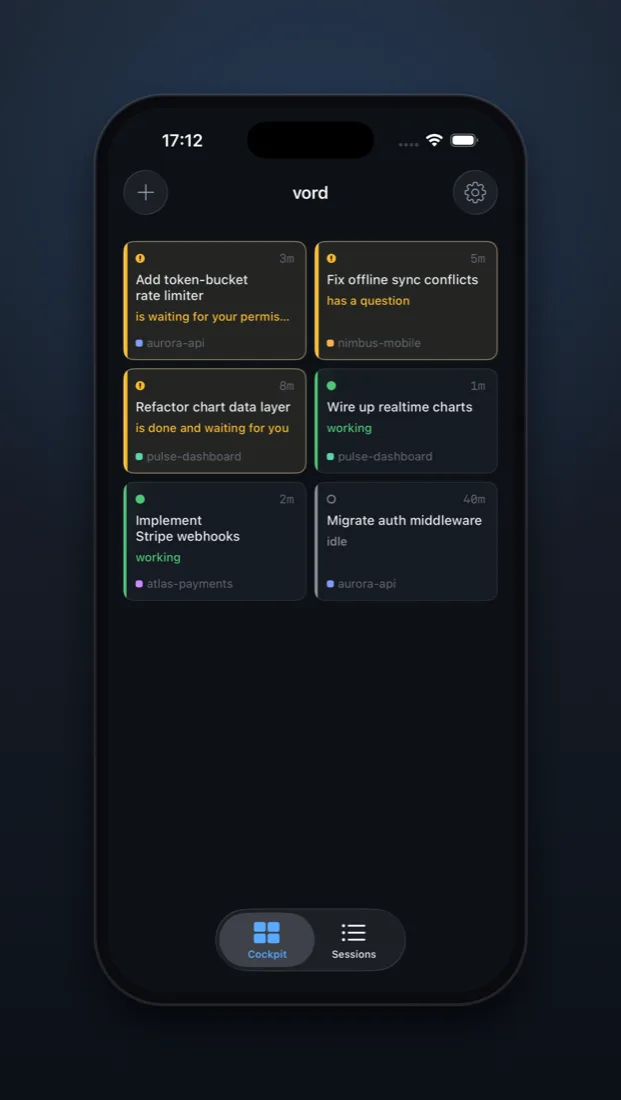
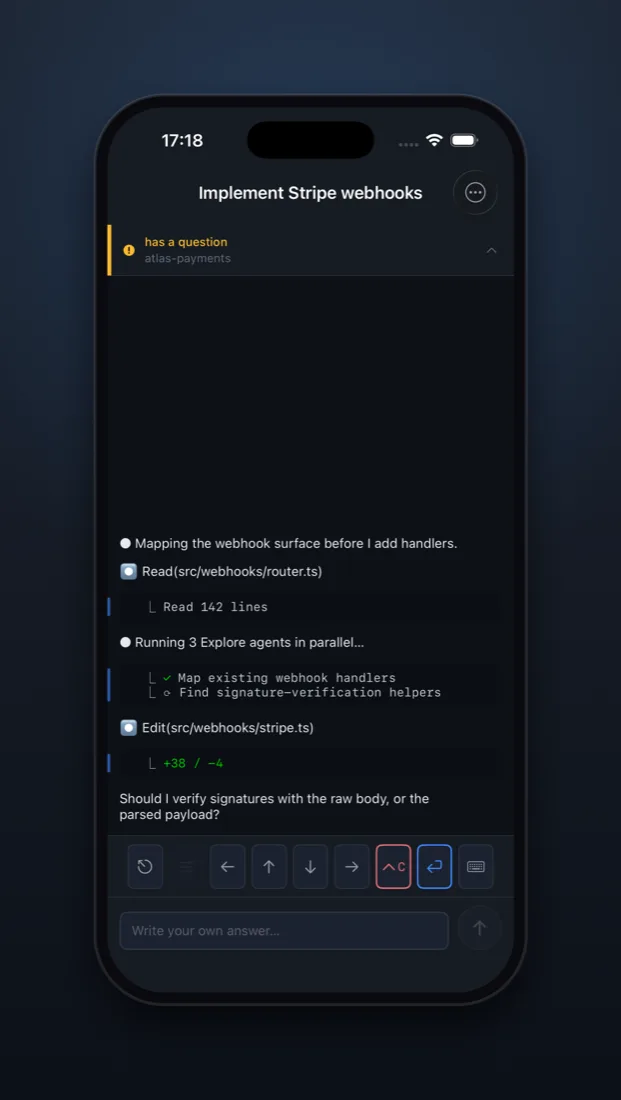
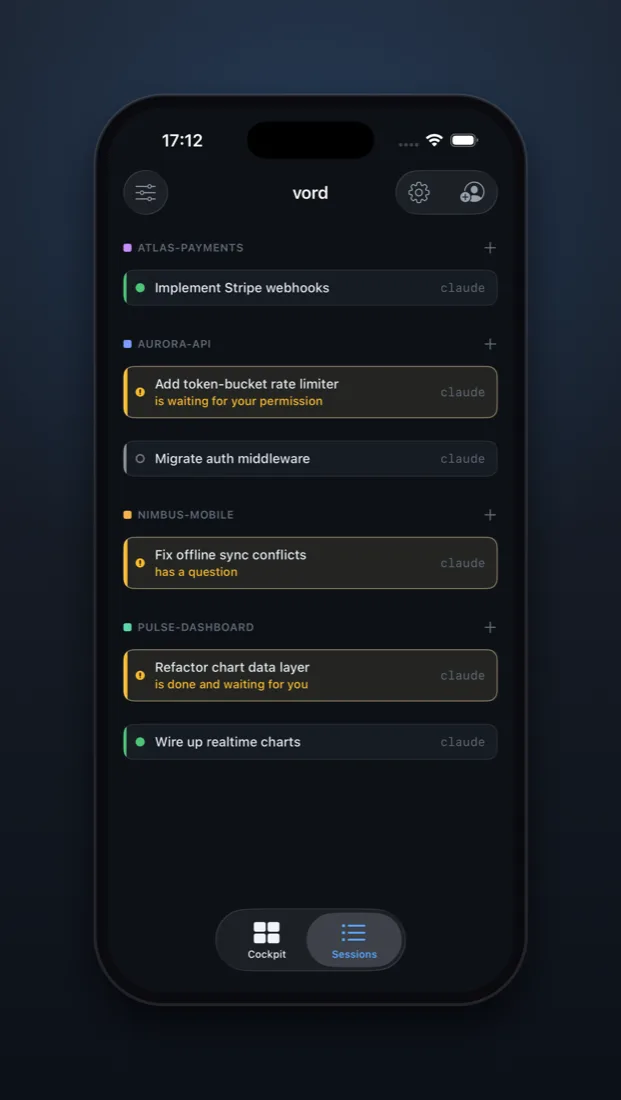
vord Pro puts a remote in your pocket. From the iPhone you watch terminal output live, type, and answer permission, plan and question boxes. Those boxes travel as structured data, not as text scraped off the screen, so the buttons do exactly what they say. Only terminal streams cross the wire. Your files stay on the Mac. The connection is end-to-end encrypted through a blind relay: X25519 key exchange at pairing, ChaCha20-Poly1305 on every frame, replay protection built in. The relay only ever sees ciphertext. The iPhone app is on TestFlight, invite-only while we build it out.
- End-to-end encrypted through a relay that only routes ciphertext
- Native buttons for permission, plan and question prompts
- Terminal streams only — files never leave the Mac
- iPhone app on TestFlight, invite-only for now
vord Pro · session sharing · beta
Share a running session with another person
The iPhone remote connects you to your own Mac. Session sharing connects someone else: they watch the same terminal, live, while you keep working. It runs over the same encrypted relay as the remote and it carries terminal streams only. Session sharing is in beta and part of Pro.
-
They see what you see
The other person follows the same terminal output as it happens, from vord on their Mac. No repo access, no file browser, no second copy of your project.
-
One share, one session
A share opens a single session, not your machine and not your other projects. End it when you are done and the connection is gone.
-
The relay stays blind
Sharing rides the same encrypted transport as the iPhone remote: X25519 at pairing, ChaCha20-Poly1305 per frame, replay protection. The relay only sees ciphertext.
vendor-agnostic
Five CLIs in one grid, with MCP under control
Claude Code, Codex, Kimi, OpenCode and Grok all run in vord, each with its own detector feeding the same status grid. You are not locked into one vendor's tooling to get a single view of everything. The built-in MCP manager keeps your servers in one list with live status, so you can see which one is actually up. vord also ships its own MCP server with a show_to_user tool: when an agent wants to put an image or a page in front of you, it appears where you are working instead of scrolling past in the terminal.
auto-pilot
Automate the boring approvals, guard the rest
Auto-pilot is a rule set for the three moments that keep interrupting you: a plan waiting for approval, a permission request, a finished turn. A rule can confirm, answer or block. Block rules always win, so a narrow allow rule can never override a guard you set. And a real question from the agent is never answered automatically. If it wants to know something from you, it waits for you.
optional integrations
Plugs into the rest of your stack
vord runs on your Mac and drives CLIs you installed yourself. Around that it opens a few doors outward, and you decide which ones you use.
-
Pair browsing
An integrated browser sits next to your sessions. Mark a passage of text or pick an element on the page and send it to the agent as a draft prompt, instead of describing what you saw.
-
SSH and file transfer
Saved SSH connections open as sessions like any other, and SCP moves files between your Mac and the host without leaving the app.
// the full kit
Everything else that keeps you in one window
-
Workflow blueprints
Chain several agents into one run with gates between the stages: auto, orchestrator, skeptic, human. Set a budget, allow feedback loops with a round limit, and start from one of six blueprints that ship with the app. The skeptic and the critic have to come from a different provider than the maker.
-
Scheduled jobs
Run an automation once, daily, weekly or on an interval. Runs that were missed while the Mac was off get caught up, and every job keeps a history you can read.
-
Child sessions
An agent can start visible child agents, across providers, and get their results back. It is opt-in and off by default, so nothing spawns behind your back.
-
Rules and agent context
Project rules and context the agents read before they start, including a peer hint that tells each one how many others are working in the same project.
-
Skills
Reusable instruction sets your agents can pull in, managed inside vord instead of scattered across folders.
-
Notes, local
Keep snippets and recurring commands where you work. They stay on your Mac.
-
Command palette
Jump anywhere by keyboard: sessions, projects, inspector, settings. No mouse needed.
-
What it takes to run
macOS 15 or newer, on Apple Silicon and on Intel. The app speaks English, German, French and Spanish.
-
Signed, notarized, updated
vord ships as a DMG, Developer-ID signed and notarized by Apple. Updates arrive through Sparkle on three channels: dev, beta and live.
Stop checking every tab just to find the one that needs you
vord is a native Mac app for running your agent CLIs side by side, with a status grid that tells you which one is waiting. Join the waitlist and we will let you know when there is something to try.