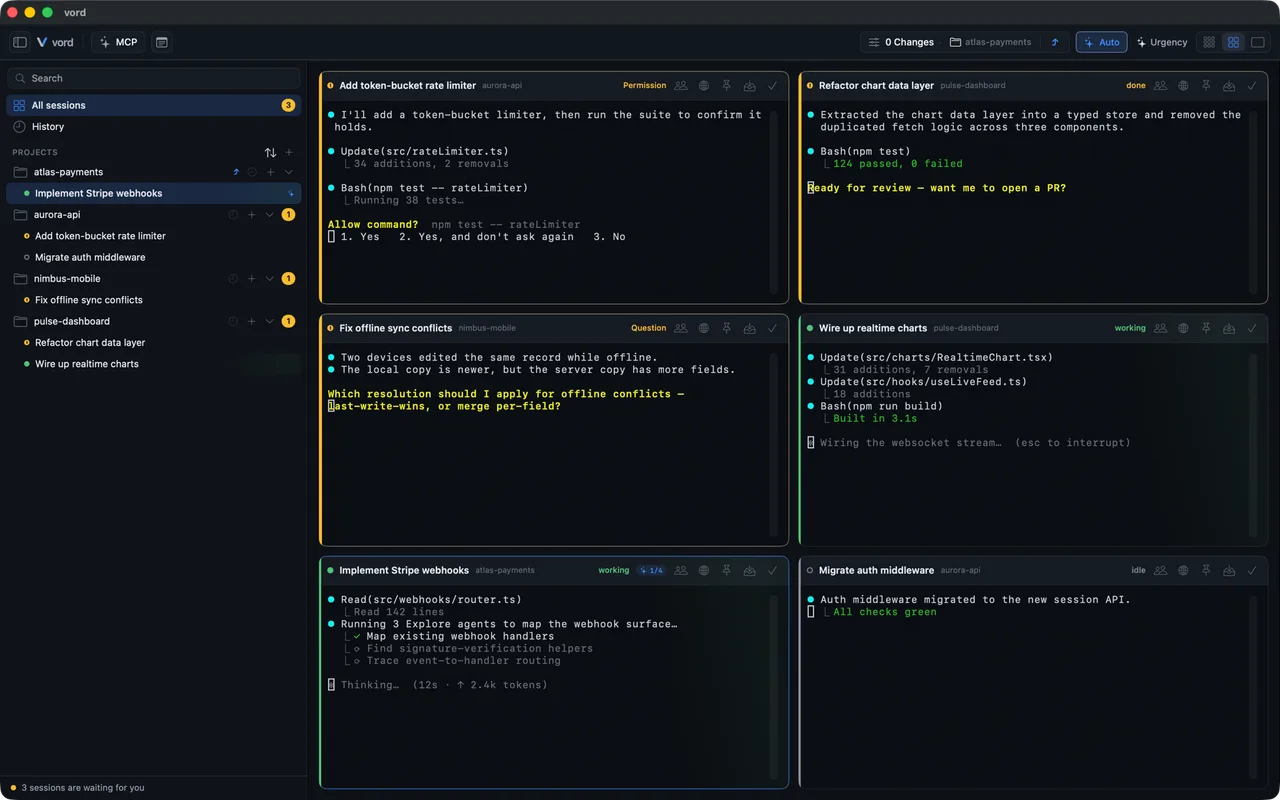
You can run five agents in tmux right now. Split the window, start one in each pane, done. It works until you try to answer the question that actually matters: which one needs me? tmux can't tell you. Neither can your terminal's tab bar. The reason why is worth understanding, because it's the whole argument for a different tool.
A terminal multiplexer shows panes, not state
tmux is very good at what it does: it multiplexes a terminal. It gives you panes and windows that survive a disconnect. What it doesn't have is any concept of what's happening inside a pane. To tmux, a blocked agent and a busy agent look identical, because both are a stream of bytes. It can show you all the streams at once. It cannot tell you that pane 3 is waiting on a permission prompt while pane 1 is mid-thought.
So you read. You scan the panes, parse the output with your own eyes, infer state. That works for two agents. It collapses at five, because now you're the status engine, running in a loop, slow, forgetting things.
To know the status, you have to host the session
Here's the technical crux. You can't reliably tell a working agent from a waiting one by looking at output from the outside. Output is ambiguous: a long pause might mean thinking, or it might mean a prompt is sitting there waiting for input below the fold. Colour and spinners help a human eyeball but don't give you a clean signal.
The way to get a clean signal is to run the session in a real PTY that you own. When you're hosting the pseudo-terminal yourself, you see every byte the agent writes and you control its input. That's the foundation everything else is built on. Without it you're guessing from the outside. With it you have ground truth. vord does this for five CLIs: Claude Code, Codex, Kimi, OpenCode and Grok. You install and start them yourself, and vord hosts the sessions.
Hooks beat heuristics, and you want both
Owning the PTY gets you the bytes. But the best signal isn't even in the bytes. It's the agent telling you directly. A CLI like Claude Code can fire hooks on state changes. Point those hooks at a local listener and the agent reports its own status: started, waiting for permission, asking a question, waiting on a plan, finished. That isn't inference. That's the agent saying what it's doing.
Screen heuristics still earn their place as a fallback. When hooks aren't wired up, or for a CLI that doesn't emit them, you read what the session prints and make the best call you can. The right design uses the strong signal when it's there and drops to the heuristic when it isn't, never the other way around.
The payoff of the strong signal is precision. A heuristic can tell you "probably waiting." A hook tells you "waiting, because permission, for this command." That difference is what makes a notification useful instead of noise.
Sorting is the feature you didn't know you needed
Once you actually know each session's state, you can sort by it. This sounds trivial. It is the single most useful thing the grid does.
Put everything waiting on you at the top. Now the screen is the queue. You don't search for the blocked session, because it's already first. The working ones drift down where they belong; you're not supposed to touch them anyway. The idle ones sit lower still, next to anything that has exited or hit a usage limit. The layout does the triage so your eyes don't have to.
Compare that to tabs, where position is fixed by when you opened them. The blocked agent could be tab 1 or tab 6, and the only way to find out is to visit each. Fixed-position tabs make you do linear search. Status-sorted cards give you the answer at the top.
Density is the other half
Knowing status lets you collapse detail safely. When you only need to know who needs you, you don't need five scrolling terminals. You need five status cards you can scan in a glance. When you go in to act, you open that one session at full size and type into a real terminal. You change how much you're shown based on what you're deciding, instead of staring at five full terminals you can't read all at once anyway.
So: tabs or a grid?
Tabs are right when you have one or two long-lived sessions you're working in directly. A grid is right when you have many sessions that periodically need a decision and you can't predict which or when. That's the agent workflow exactly.
The terminal was built for the human at the keyboard. The grid is built for the human supervising a fleet, which is the job now.